Streamlit vs HTMX LLM Streaming Chatbots
May 16, 2024
When designing LLM-based chatbots, streaming responses should be prioritized. A complete response from the LLM may take 10–20 seconds, while the first tokens are available in less than a second. If a user is waiting 10+ seconds for a response, there is a high chance that they will leave your site or product. We can get a ballpark of this by looking at website bounce rates (visitors who enter your site and then leave) vs website load times and assuming chatbots follow a similar pattern. If it takes 10 seconds to load, then there is a 60% bounce rate, so over half of your users leave your site.
Since streaming is an integral part of building LLM chatbots, I’ll compare the performance, flexibility, and ease of development of a simple streaming chatbot in Streamlit and HTMX. The HTMX and Streamlit chatbot code is available on my GitHub here — llm-chat-streaming-comparison.
The TLDR of the results are shown below.
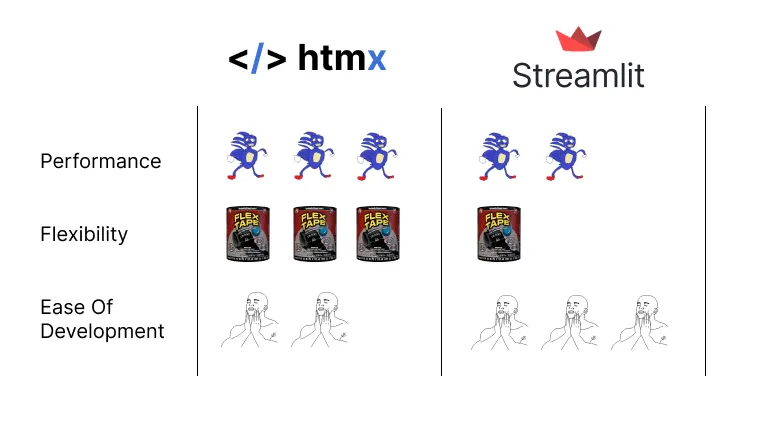
HTMX is the overall winner, having three “gotta go fast Sanics” of speed, three flex tapes of flexibility, and two “feels good guys”. The skeptics among you may be thinking two “gotta go fast Sanics” is low for Streamlit when it brands itself as being built specifically for data apps. Let’s dig into these metrics and see what is going on.
Background
HTMX is a library that allows you to access modern browser features directly from HTML and not an app development framework like Streamlit. We’ll need to make a couple of decisions about the backend we want to use with HTMX to create a fully functional app.
For the HTMX tests we’ll use FastAPI with Starlette and Uvicorn (python) as the backend. It is a popular choice for python backends, and one of the fastest — All libraries rank in the top 6 in this performance benchmark — Web performance benchmarks
HTMX gives us the flexibility to use any backend we would like, so rust or go would also be good and faster options. However, using a Python framework makes it easier to compare the code between the HTMX and Streamlit apps.
Now that we have our backend for the HTMX app, we can compare the two architectures to get an idea of how each one works. It is common for chatbots to implement websockets, and Streamlit uses websockets for everything by default, so I’ll also use websockets with FastAPI and HTMX.
Architectures
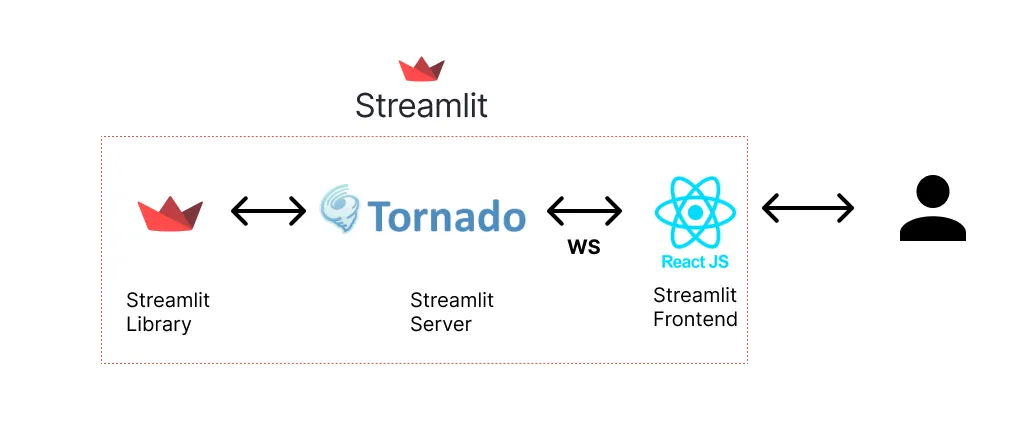
It was hard to find information on Streamlit’s backend architecture, but luckily, it is an open-source project, so we can take a look at the code to find a few key details. First, we can see that Streamlit is using the Tornado Python library for serving. Tornado is an interesting choice since it has middle-of-the-pack performance based on the benchmarks we previously looked at. Next we can see that React is used as the frontend for Streamlit. The Streamlit component lib consists of React typescript code for generating React components from your Streamlit python code.
GitHub — Tornado server Streamlit code
GitHub — React Components Streamlit code
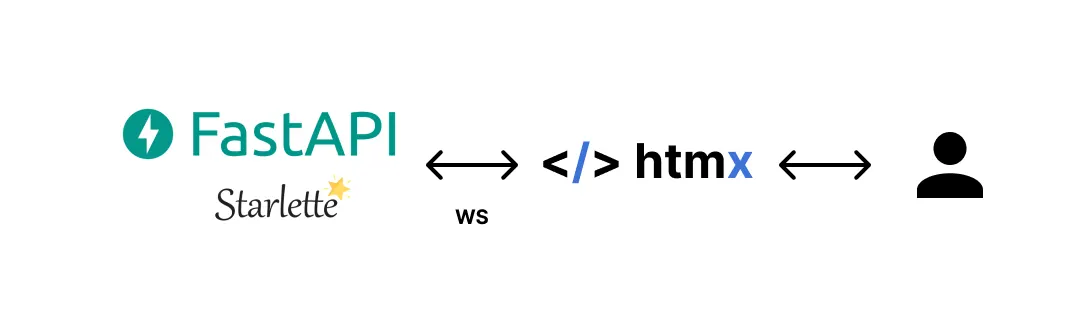
FastAPI uses Starlette for websocket handling, which still ranks significantly higher than Tornado in the performance benchmarks. Starlette and the HTMX websocket extension let the developer easily send and receive to and from the webpage.
Using Websockets with HTMX — Websockets
FastAPI websockets with Starlette — Starlette
We can see both architectures have python backends and use websockets for communication. Comparing the two apps is still not quite apples to apples, but it is a reasonable representation of how people may build either app. Also, keep in mind, Streamlit is implementing some other optimizations, such as protobuf serialization, that should help make it more competitive performance-wise.
Performance
Backend
To test performance, I implemented the same chat generator for both apps and tested how long it took to finish streaming the response to the front end. I compared the performance at 1K, 10K, and 100K words. The results of the tests are shown below.
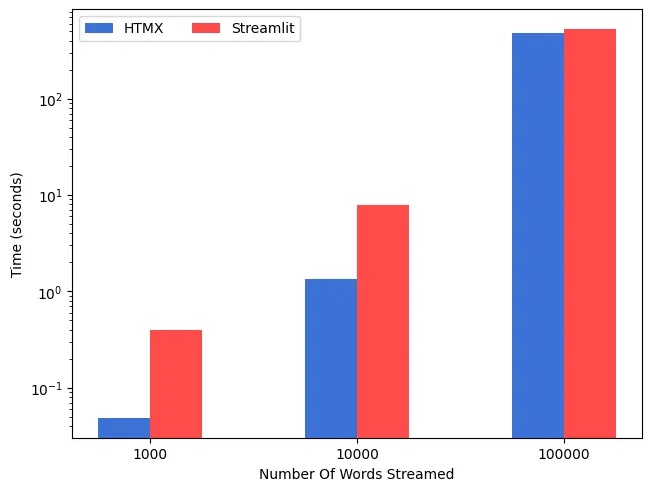
The results line up with what we might expect. Despite the protobuf serialization, the overhead of using React and creating the React components slows Streamlit down.
HTMX has less javascript overhead and a smaller bundle size than React, which can give it an edge. Using Starlette over Tornado also gives our HTMX app an advantage over Streamlit. Overall, the HTMX app has a lot less overhead, resulting in faster runtimes than Streamlit.
Note that the performance time was based on the time it took for the backend to send all of the streamed data to the frontend. In some cases, the HTMX app frontend would still be in the process of rendering even when the backend had finished sending the text.
Sometimes the Streamlit app would freeze with a blank screen, and sometimes, it would immediately return part of the text and then freeze before loading the rest of the text simultaneously (not streaming).
HTMX does not have the same issue, and consistently streams results to the page. This creates a more pleasant experience.
Frontend
For the frontend, I thought it could be interesting to see how the page load speed for both apps varies. To test this, I created an AWS lightsail app for the HTMX and Streamlit image on GitHub, and used the the free pingdom tool to check the sites. The results are shown below.
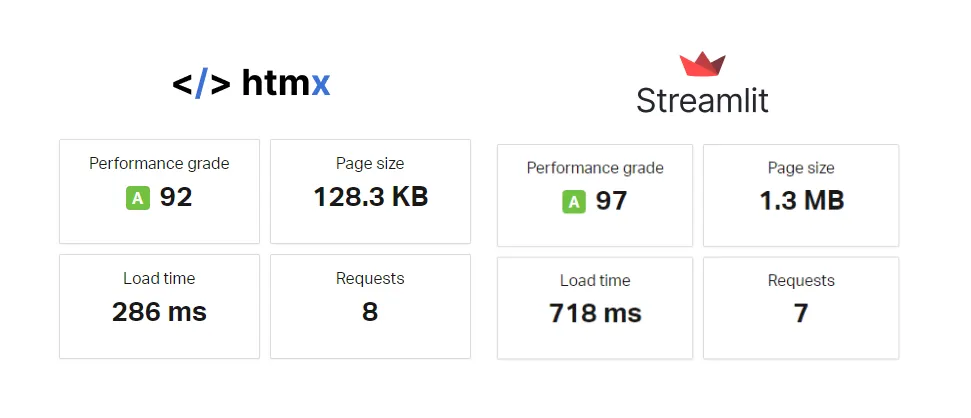
As we expect, HTMX has a much smaller page size, which results in a faster load time. Streamlit still has good performance in this case but can’t beat HTMX. Also, the Streamlit docker image was ~670MB, while the HTMX image is about 3x smaller at ~220MB.
The “performance grade” for HTMX was slightly lower because I didn’t gzip the HTTP responses, but the page size is already 1/10th the size of Streamlit and the load time is over twice as fast as Streamlit.
Flexibility
In this category, Streamlit ranked low because with Streamlit you are forced to use their architecture of Tornado and React, even if it is in the background. Some customization options are only available through styling and creating customized React components. However, if you get in the weeds customizing Streamlit components, it defeats the purpose of using using Streamlit — to make building data apps easier. Now, a user needs to know JavaScript/React just to write their simple Python app that needs some additional customization. For the sake of this comparison, I’m leaving the flexibility of Streamlit low but keeping the ease of development high, assuming the user does not need to create a bunch of custom React components.
HTMX ranks high because it is fully customizable since it is just part of a larger app stack. You can use it with your choice of backend — python, go, rust, etc… and even use it alongside other frontend frameworks if that’s what you want. Basically, as long as you’re passing HTML in some form to HTMX you’re good to go.
Ease Of Development
We are still figuring out the best ways to use LLMs, and with the rapid releases of new models and paradigms, our llm based apps need to change frequently. To adapt to frequent changes in the space, it is important for our code to be able to be reworked quickly. Streamlit and HTMX-based stacks allow for high ease of development, but Streamlit has an edge for this simple chat use case.
As far as the chat development goes, Streamlit is about the easiest as it can get without going no-code. I copied about 20 lines of code for a pre-built chatbot component off of Streamlit’s docs page and that’s all it took to get the chat interface working. There were a few options for customizing the chat, but for the most part, for the UI, you get what you get (see above section about flexibility). The 20 lines of code are also pretty straightforward and easy to follow, especially since all of the websocket implementation logic is taken care of for you in the background.
st.title("Streaming Chat Test")
# Initialize chat history
if "messages" not in st.session_state:
    st.session_state.messages = []
# Display chat messages from history on app rerun
for message in st.session_state.messages:
    with st.chat_message(message["role"]):
        st.markdown(message["content"])
# Accept user input
if prompt := st.chat_input("What is up?"):
    # Display user message in chat message container
    with st.chat_message("user"):
        st.markdown(prompt)
    # Add user message to chat history
    st.session_state.messages.append({"role": "user", "content": prompt})
    # Display assistant response in chat message container
    start = time.time()
    with st.chat_message("assistant"):
        response = st.write_stream(response_generator(st.session_state.messages))
    end = time.time()
    _logger.info(f"Total Time: {end-start}")
    # Add assistant response to chat history
    st.session_state.messages.append({"role": "assistant", "content": response})
One ding for ease of development with Streamlit is troubleshooting. If something is going wrong in the frontend, like in the example for these tests where the Streamlit app froze with a blank screen, it is hard to trace back the error. In the case of the frozen screen error, I had no clue what was going wrong in Streamlit, and I wasn’t about to spend hours figuring it out. Even though Streamlit is open source, I don’t want to spend my time helping a company that was acquired for $800M fix bugs in its software — Streamlit Snowflake acquisition.
I had to rank HTMX lower in terms of ease of development than Streamlit, but it was still a pretty good development experience. While the Streamlit app only took ~20 lines of code the HTMX app (python backend and HTML) took ~200. However, even though it was more lines of code, a lot of the code was just templating HTML, which is more just formatting than coding. For the chat, we do have to code our own websocket endpoint in the backend, but this is fairly well documented. The components like the chat UI and websocket setup could be re-used now that we have built them, which would make future projects easier.
env = Environment(loader=FileSystemLoader('templates'))
history_template = env.get_template("chat_history.html")
stream_template = env.get_template("chat_stream.html")
session_state = {}
# Initialize chat history
if "messages" not in session_state:
    session_state['messages'] = []
async def response_generator_helper(user_message:str):
    full_text = ""
    stream_generator = response_generator(user_message)
    for stream_text in stream_generator:
        if stream_text is None:
            continue
        full_text += stream_text
        stream_html = stream_template.render(current_stream = full_text)
        yield stream_html
async def handle_websocket_stream(websocket: WebSocket, user_message: str):
    async for stream_html in response_generator_helper(user_message):
        await websocket.send_text(stream_html)
    return stream_html
async def handle_websocket_chat(websocket: WebSocket):
    await websocket.accept()
    while True:
        user_message = await websocket.receive_json()
        session_state["messages"].append({"role": "user", "content": user_message["chat_message"]})
        chat_history = history_template.render(prev_messages=session_state["messages"])
        await websocket.send_text(chat_history)
        start = time.time()
        stream_html = await handle_websocket_stream(websocket, user_message["chat_message"])
        end = time.time()
        _logger.info(f"Total Time: {end-start}")
        session_state["messages"].append({"role": "system", "content": stream_html})
Ease of development can be pretty subjective, so check out the code and judge for yourself if you care enough — Source Code
Anti-Patterns
While trying to find out more about Streamlit’s architecture, I ran into a lot of content about using Streamlit with FastAPI. I’m calling this out as an anti-pattern for two reasons:
- You lose the benefits of the Streamlit tornado to React websocket communication
Streamlit brands itself as a data app partially because of the optimizations it uses around protobuf serialization and websocket communication for data transfer. By using FastAPI you bypass these optimizations when you send data from the FastAPI server to the Streamlit server.
- You end up using two python webservers for a task that could be done by one
If you are already setting up your own Python server, this is an obvious use case for HTMX over Streamlit. At this point all Streamlit is doing is creating a few frontend components for you, which could be done more efficiently and faster with HTMX and a few HTML component templates.
FastAPI Streamlit Anti-pattern:
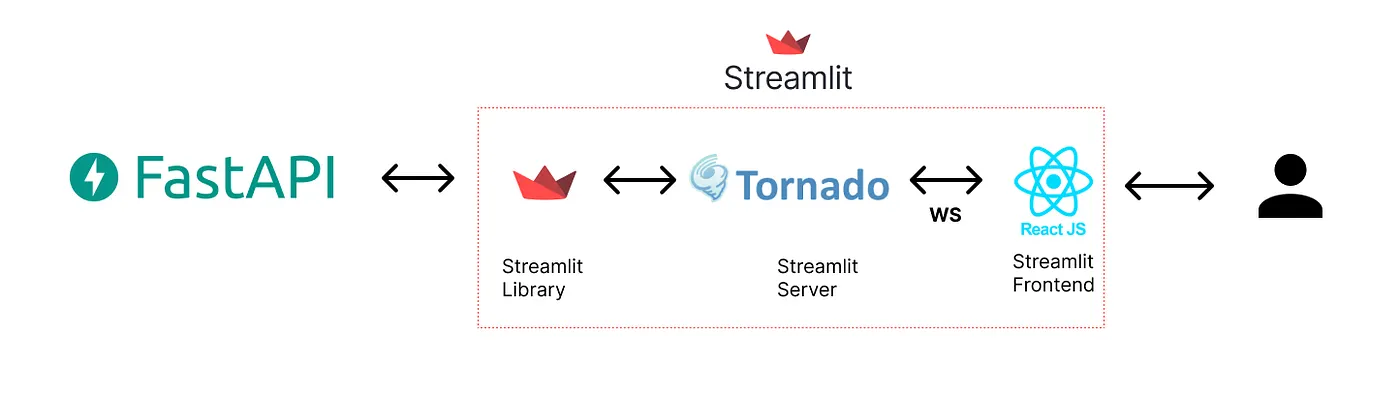
I think some of these redundant Streamlit architectures come about because people think of Streamlit as a frontend instead of an app that includes its own Python server and frontend framework.
Conclusions
Ultimately, there is a place for both Streamlit and HTMX to build LLM chatbots depending on the scenario, but most of the time HTMX wins out. Given that the performance is mostly similar between the two, flexibility and ease of development should be the main considerations. I’ve outlined a decision tree for choosing HTMX or Streamlit below.

Streamlit is mostly good for small projects with lots of changing requirements and experimentation. For most other cases, HTMX is the way to go. Of course there are other cases where a full frontend framework like React would work better, but for those cases, Streamlit is also probably not a good choice.
If I have any personal projects where I need to build an LLM chatbot in the future, I’ll be using HTMX.