Snowflake UDF Performance Considerations
Oct 27, 2022
In June 2022 Snowflake released snowpark for python. This new feature can be game-changing by allowing you to
easily run data science workloads at scale without spinning up any additional infrastructure. Since python
support in Snowpark is still fairly new, developers are still experimenting and creating workflows around
the new Python APIs. My goal for this post is to provide some insight into the performance of python
User-Defined Functions (UDFs), specifically comparing UDFs to Vectorized UDFs.
With regular Snowflake UDFs you are able to execute python (and other languages) code directly in Snowflake
typically on a row-by-row basis. Vectorized UDFs allow you to execute python code batches instead of row-by-row
to achieve better performance and to more easily work with DataFrames in Snowflake UDFs. Pandas DataFrames
are commonly used for data preparation for data science. However, the main performance benefits from using
Pandas DataFrames come from the ability to batch calculations and execute them using optimized cpython code.
In a traditional UDF, this optimization is lost because it executes row-by-row, so the operations can't be
batched.
Performance Testing
To test performance I chose to focus on two simple functions, one to add two numbers together and another to
compute the factorial of two numbers and add the results. For both functions, I implement one version using
plain python and another with vectorized methods using Pandas. Then I test the functions on datasets of
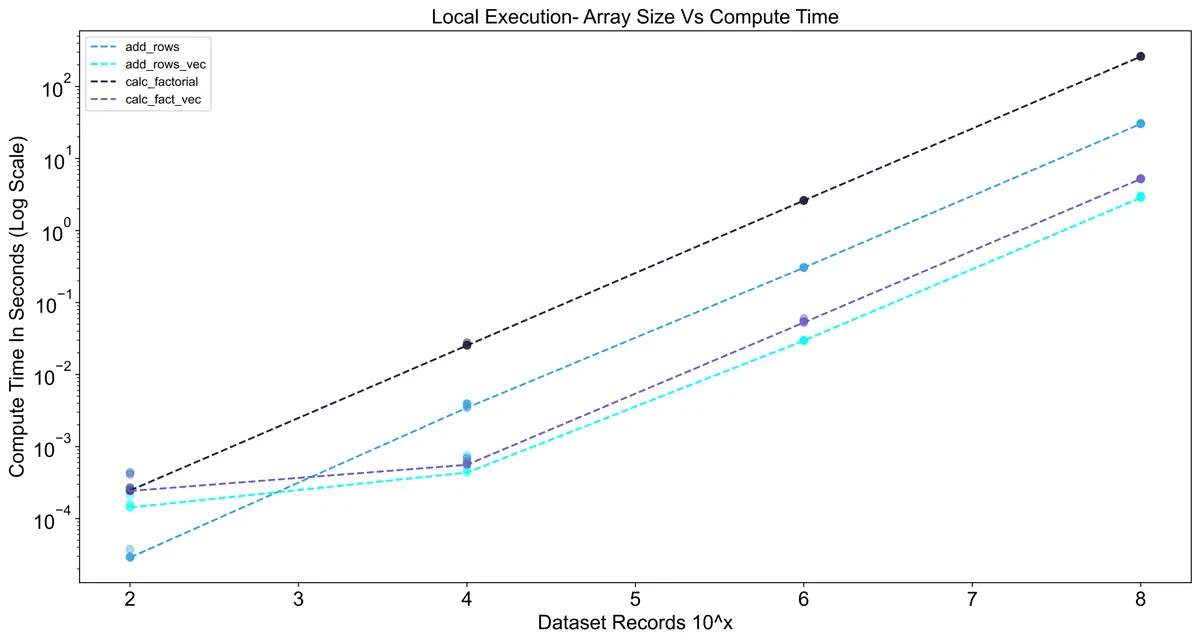
various sizes ranging from 10^2 rows to 10^8 rows. In the chart below you can see that the vectorized
methods are much faster, but they have a higher initial compute cost. The dashed lines represent the best
score from 5 runs, and the points represent each of the 5 runs. Keep in mind that these results are
specific to my machine, so your results may vary. The code for these experiments can be found on my
GitHub page:
snowflake-udf-performance-testing
Now that we have a baseline, we can translate these functions to Snowpark UDFs and test them in Snowflake.
Some slight re-working of the functions is required to get them into a format that can be uploaded to Snowflake,
but the Snowpark UDF decorator makes the uploading process simple. An important note for packaging is that for
vectorizing the UDFs we need to add the pandas package to the UDFs, since the vectorized data is manipulated
using pandas dataframes.
For testing in Snowflake I also took into account the size of the warehouse to see its impact on performance.
Snowflake warehouses have a slight startup time when they are not warm, so I ran the tests 10 times in a row
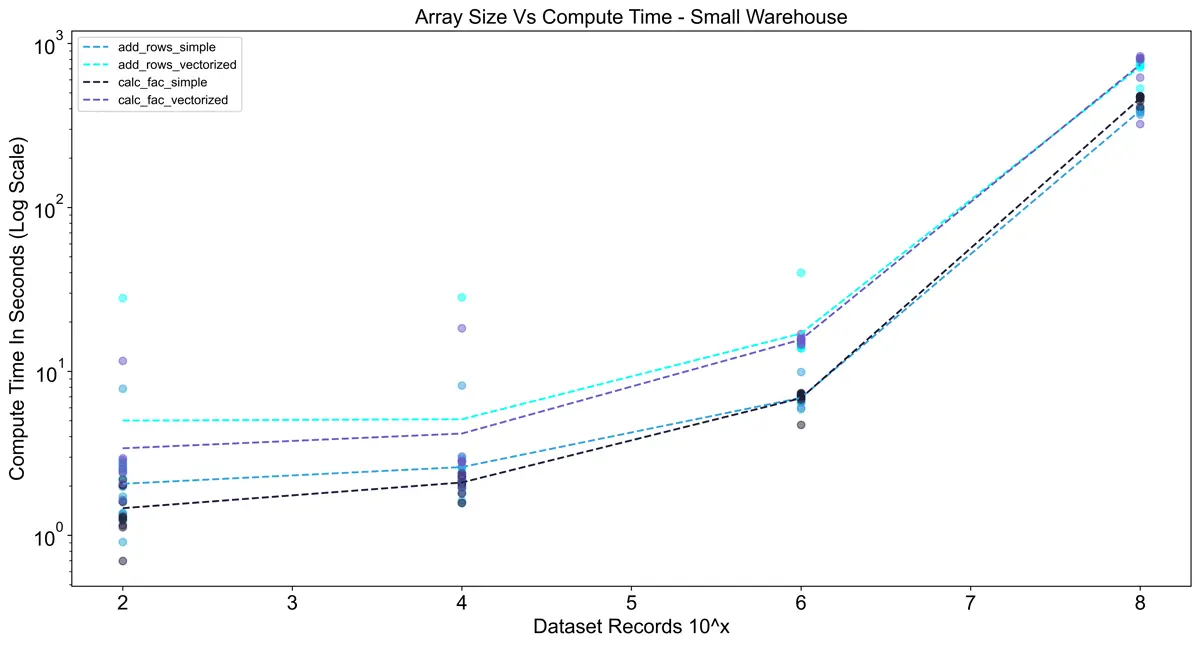
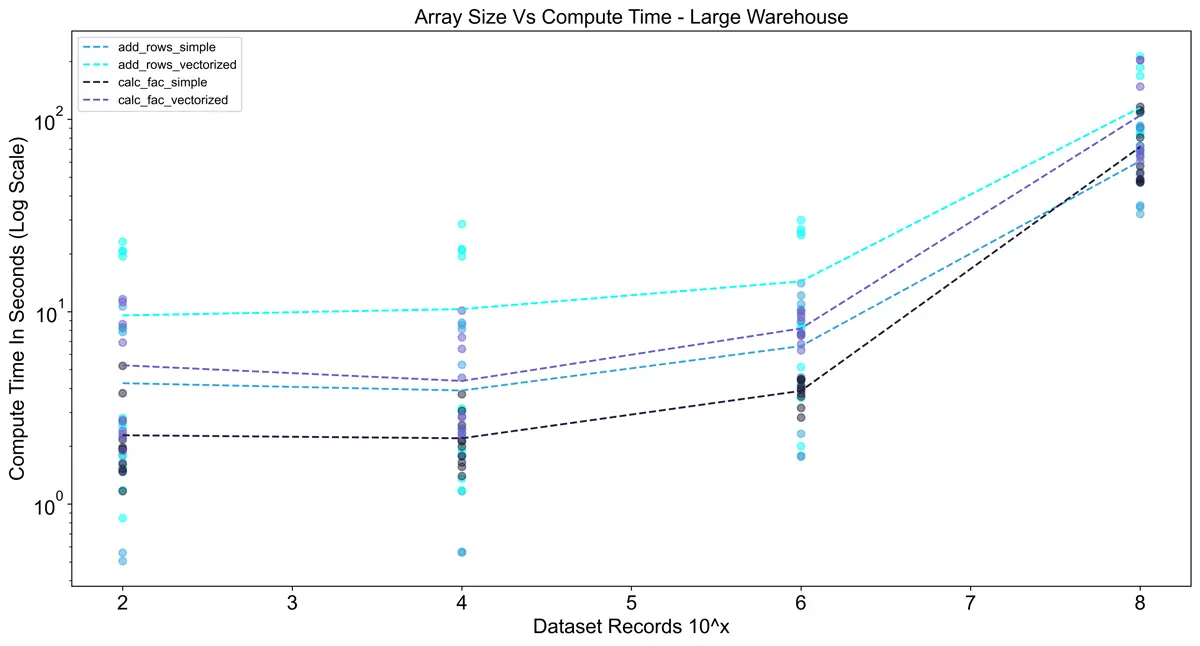
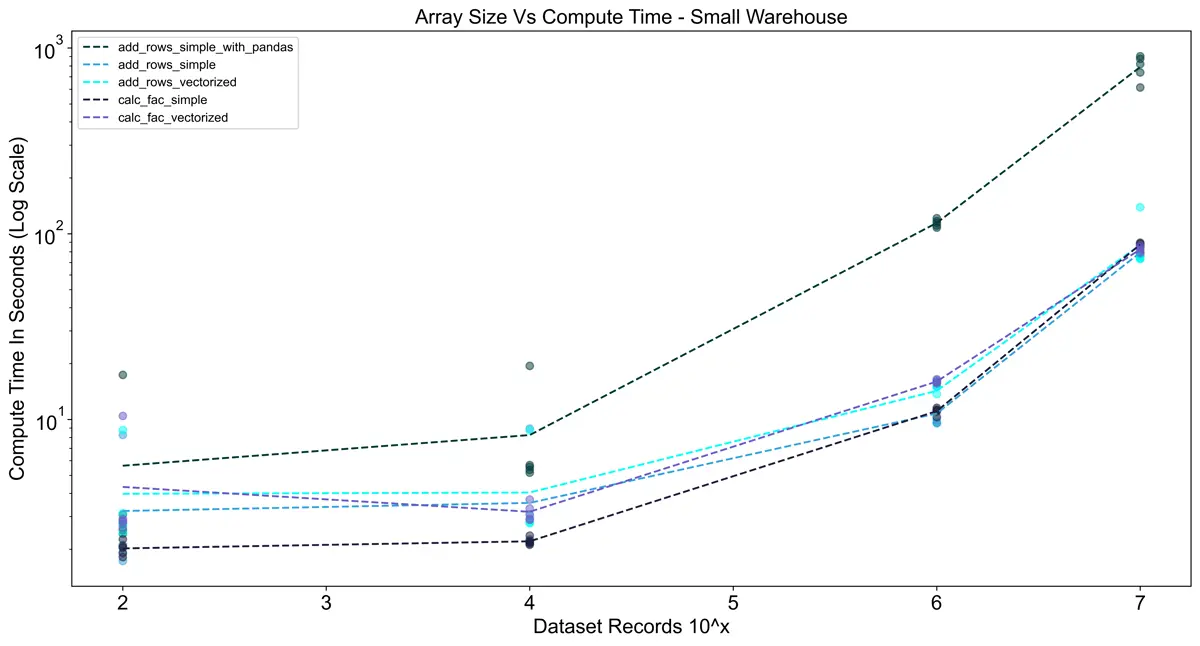
per warehouse to minimize the effects of the startup. Interestingly, in the charts below you can see that the
vectorized UDFs actually took longer than the vanilla Python implementation in all cases. I think this is due to
a combination of two things:
- The pandas package takes time to load. Since vectorized UDFs are called in batches, the pandas library is
being loaded for each batch (1,000,000 rows in this case), adding overhead. - Snowflake does a good job of scaling row-by-row execution of vanilla Python code.
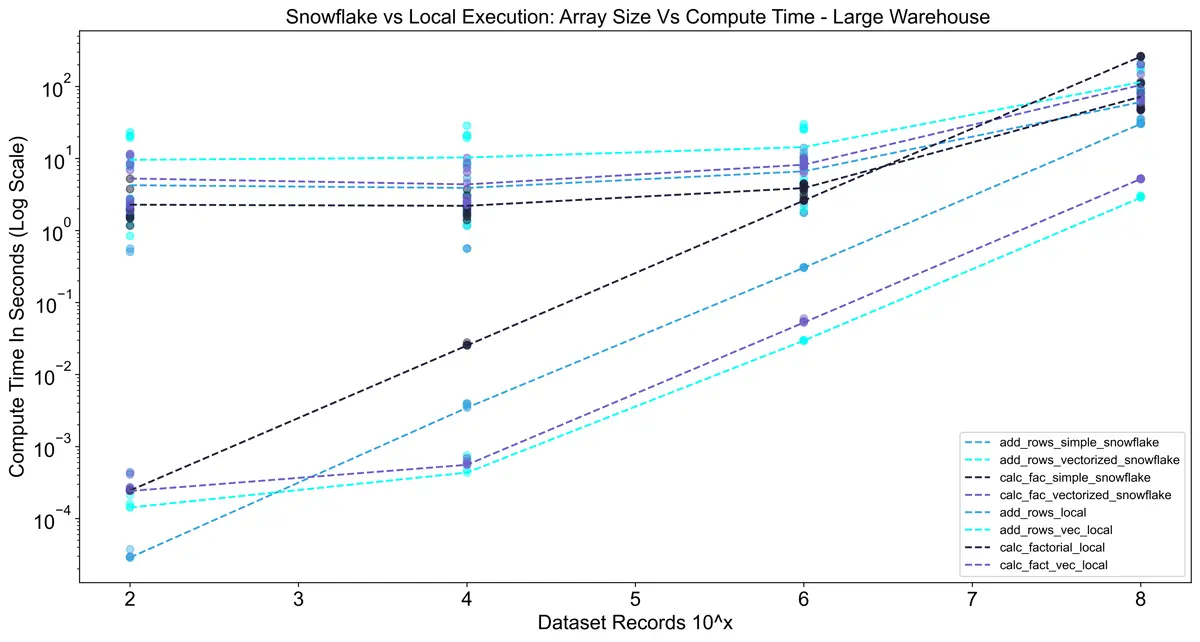
The charts below show execution time only (no queueing or compilation time).
Using the large warehouse shows a significant improvement over using a small warehouse.
For 10^8 rows the execution time was ~8x faster, but for smaller dataset sizes, there was almost no difference.
This reinforces the importance of sizing warehouses optimally since a large warehouse costs 4x the credits
of a small warehouse.
When we compare the UDF performance to local results, Snowflake UDFs scale better.
However, at this scale (~200 MB dataset), running locally was still efficient.
Snowflake will scale much higher, but keep in mind local performance depends on your machine’s specs.
For reference, my i7-8700k CPU has performance roughly comparable to an Apple M1 MacBook Pro.
Non-Vectorized UDF With Pandas Comparison
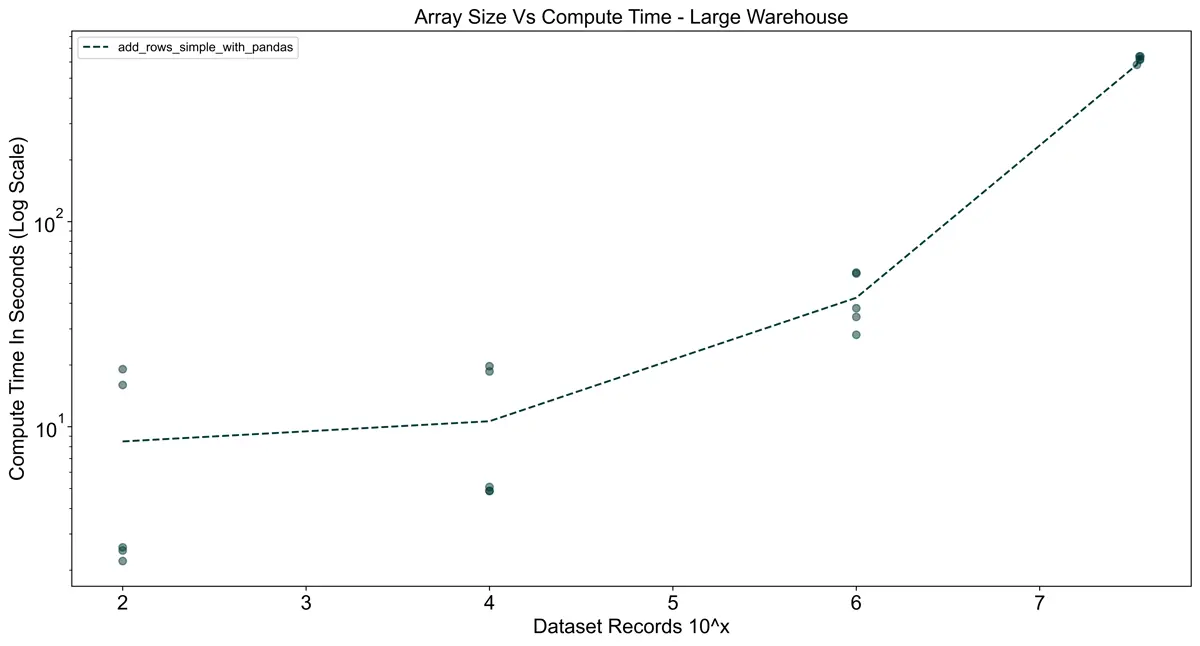
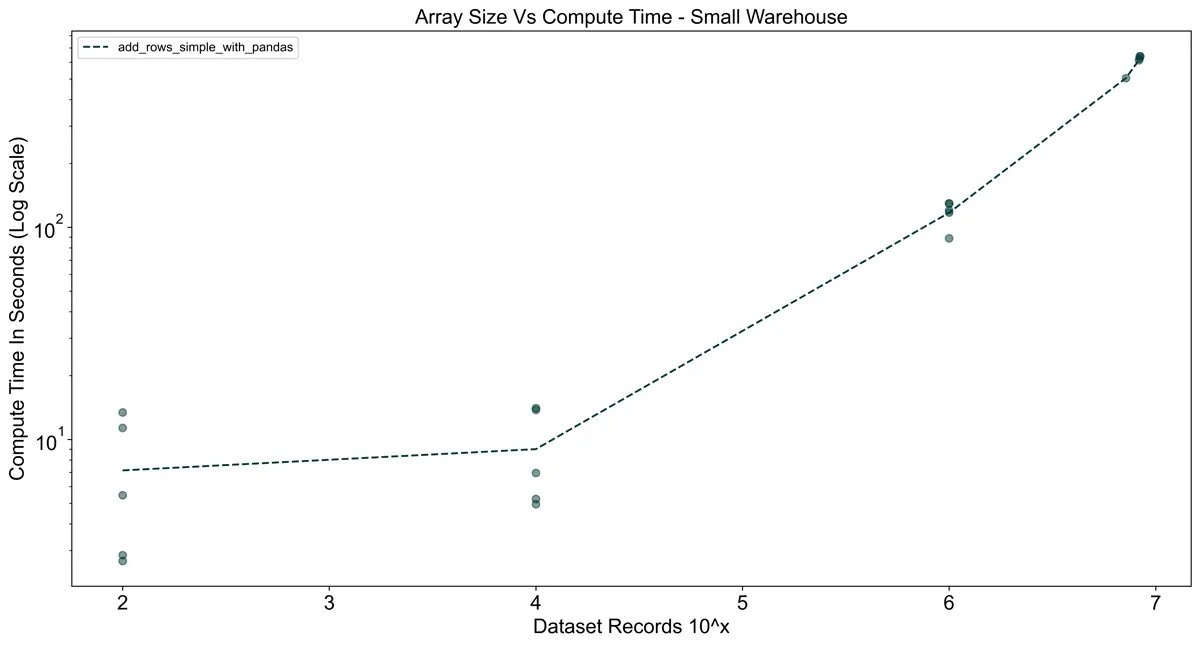
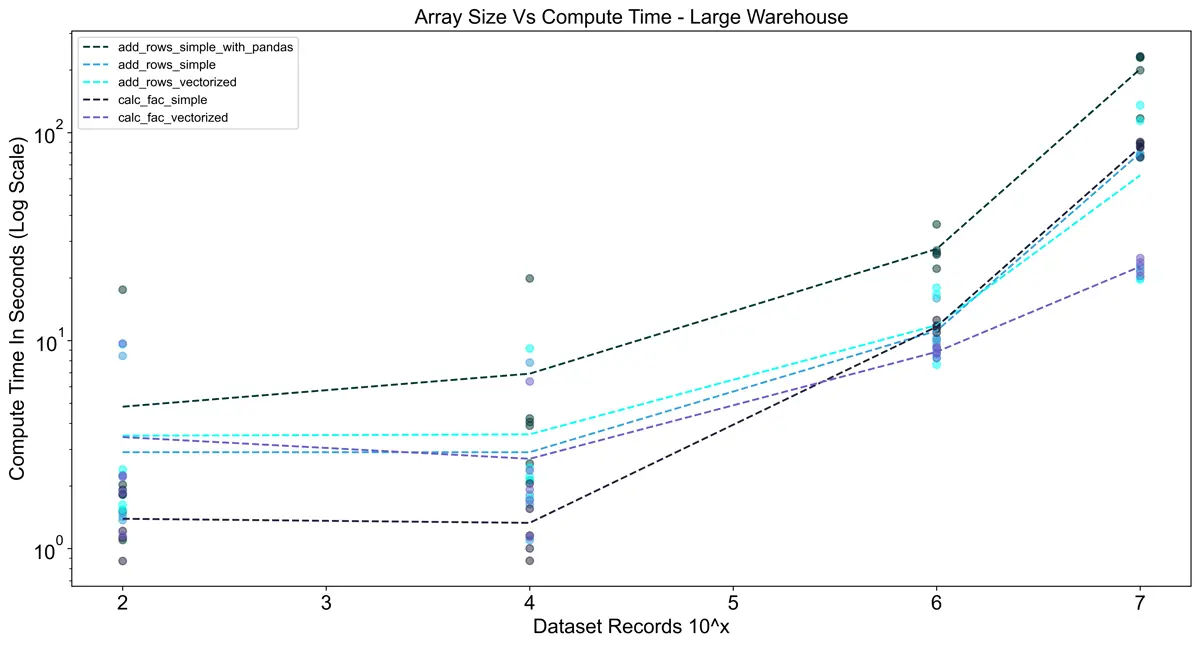
To show the effects of using pandas without vectorizing, I created a UDF that imports pandas without batching.
The result was a significant increase in compute time. For the largest dataset (10^8 records),
I stopped the queries early after 10 minutes of execution.
Clearly, if you are already using pandas you need to vectorize your UDFs.
Vectorized Batch Size Comparison
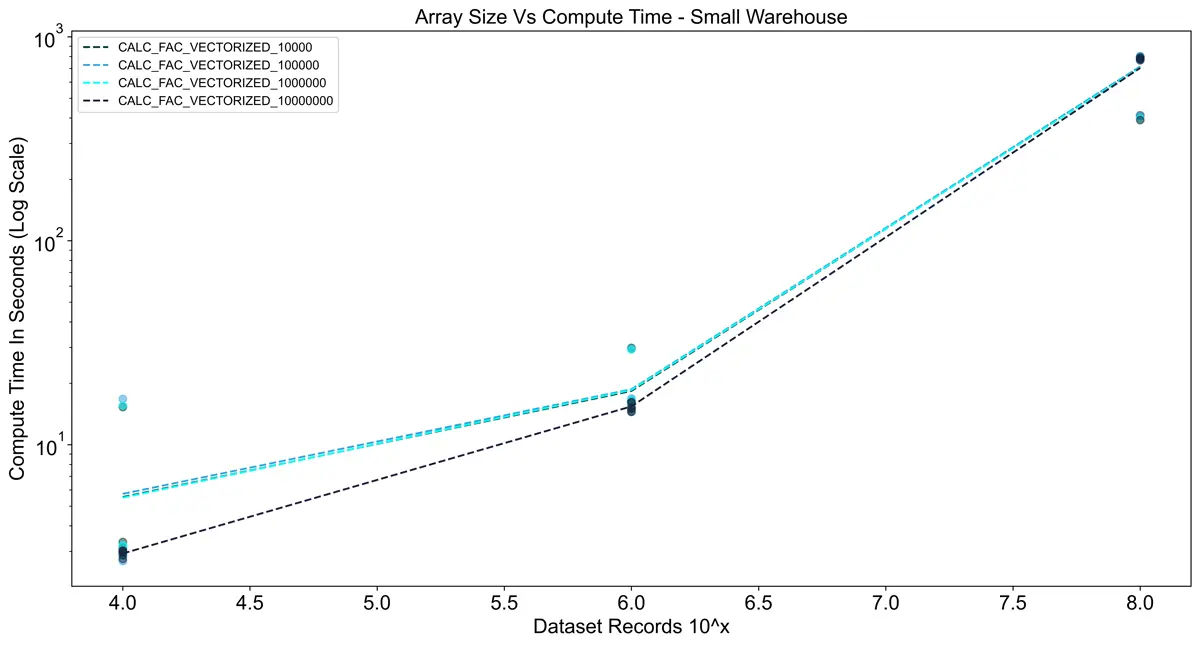
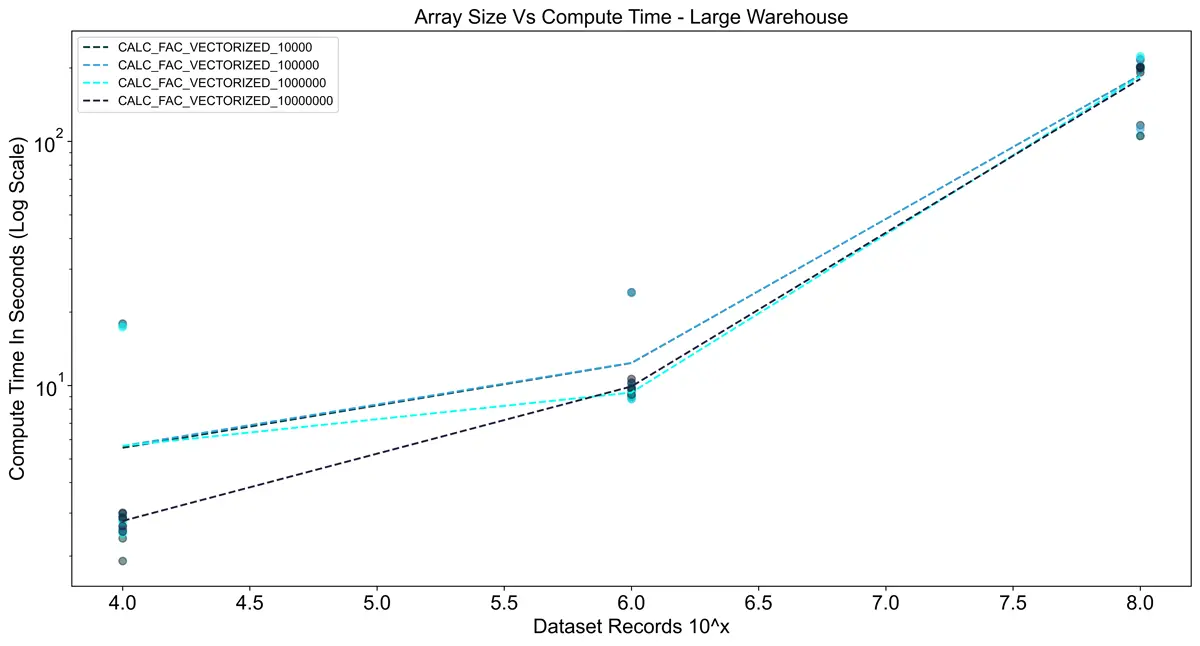
I was also interested in the effects of batch size on UDF performance.
Batch size seems to play only a minor role in performance, as long as it’s sufficiently high, even on large datasets.
As long as the batch size does not exceed the 60-second execution limit,
you probably don’t need to worry much. The Snowflake docs also state that
the batch size may not guarantee the exact number of rows per batch.
Takeaways
- If your function can run in vanilla Python with decent performance, vectorization is probably not needed.
- Always vectorize UDFs that use external libraries like Pandas.
- Keep warehouse sizing in mind — a larger warehouse may save both time and credits compared to a smaller one.
- Batch size is not very important (with some caveats).