Deploying RAG on Kubernetes Lessons Learned
Nov 19, 2024

While retrieval augmented generation (RAG) has been overshadowed by large language model (LLM) agents lately, RAG is still a great option when advanced search functionality is needed. One of my latest project has been to set up a customized production RAG system for class documents.
The goal of this generative AI based project is to help college students find class information more easily to improve student experience and outcomes. This is a good use case for RAG, since enhanced search capabilities are needed.
As we are nearing the end of the school semester, the project has been used and deployed for around 3 months. While the project is still in its early state, we are open sourcing the project for anyone to use and sharing our initial experiences and thoughts with the community.
You can find the app code with the helm chart on GitHub
In the time that app has been deployed, it has answered over 250+ questions, and helped students in over 60 sessions (We do not track any sort of PII, so we use a randomized session id to protect student information). More information and data related to the study will be available when follow up research work has been completed. For this post I’ll focus on the development, deployment, and architecture of the generative AI app.
App Architecture
From a high level the architecture is similar to a typical python application. Later on we’ll drill down into the RAG workflow. As I worked on this app in my free time, I didn’t have time to add all of the bells and whistles that I was hoping for.
We chose to deploy the app on Google cloud and Kubernetes due to robustness being a priority. I knew I might not have a lot of time to troubleshoot any issues that could come up during production. I had originally mocked up the POC of the app in Streamlit, but chose to create the first version of the app with HTMX and FastAPI for better flexibility and performance.
The architecture diagram below goes into more detail about the high level components we used.

Components:
- GCP — The production app is deployed on GCP. We had grant credits on GCP for the research, but I also like the kubernetes experience on GCP the best out of the three main cloud providers
- Kubernetes — Kubernetes is fantastic to develop with. It is easy to switch from a local environment to a cloud environment for testing, and it supports every component you need to deploy an app to production.
- Load Balancer — We used a GCP load balancer to manager the traffic from the public internet
- Nginx Ingress — Nginx has great support with kubernetes and is really well documented.
- Python Backend — In the backend we used the framework, llama-index, for RAG, FastAPI for serving, and HTMX for the UI.
- Postgres DB for state — We have a postgres database to manage state, and save relevant data to the research. We also a nightly job that backs up the database.
- Optional Local LLM hosting — Optional Ollama support was added to allow for running the stack locally without the need for an OpenAI API key.
A couple high level considerations factored into our choice of Kubernetes and GCP for the cloud platform and OpenAI for the LLM.
Robustness
I may not have time to fix any issues right away, so it is important that the deployment was robust to failures. Deploying on GCP and Kuberentes helped ensure that the app was highly available, and could restart automatically if there were any failures.
I’m pleased to say there was only one issue I had to fix related session state, and I was able to just push the changes to my CI/CD pipeline which were propagated to the gcp k8s cluster automatically. Other than that one issue, I didn’t have to intervene in the course of the 3 months.
Cost
The most expensive part of the app is the cloud hosting. Serverless options like AWS Lightsail are cheaper, but for me, Kubernetes makes it easiest to add additional services and test them all together locally before pushing changes to the cloud cluster.
LLM costs were actually very cheap. For the production LLM, we use OpenAI’s chatgpt 3.5, due to its good price to performance ratio. Based on our testing, hosting our own llm would be much more expensive and slower for the small volumes requests we receive. However, I did add an option to use Ollama for testing LLMs locally, so no API key is required for testing it out.
RAG Workflows
When we first started the project there were less solutions that allowed you to easily query your own documents. Now we’ve seen a few services pop up for RAG over uploaded documents. These services are good for generic use cases, but obviously having our own solution allows us to have full control over all aspects of the app.
I ended up creating a custom markdown document splitter (extending Llama Index) to fit our needs. We decided a granularity of “h2” tags would be a good level to split on, where everything under h2 tags would be grouped up to the h2 chunk. You would need to have a good understanding of your documents to know if this would be applicable to your documents. To avoid the hassle of PDF parsing all documents were uploaded in Markdown format.
We also decided to only return the document references and headings of the returned document chunks, instead of the whole reference text, to try and encourage students to cross reference the source material.
Other than the above we aren’t doing anything too fancy when it comes to RAG. Likely if you have used RAG before you’ll be familiar with the following workflow that we used.
On startup, the embeddings were initialized following the markdown chunking process described above. A diagram and explanation of the process is described below.
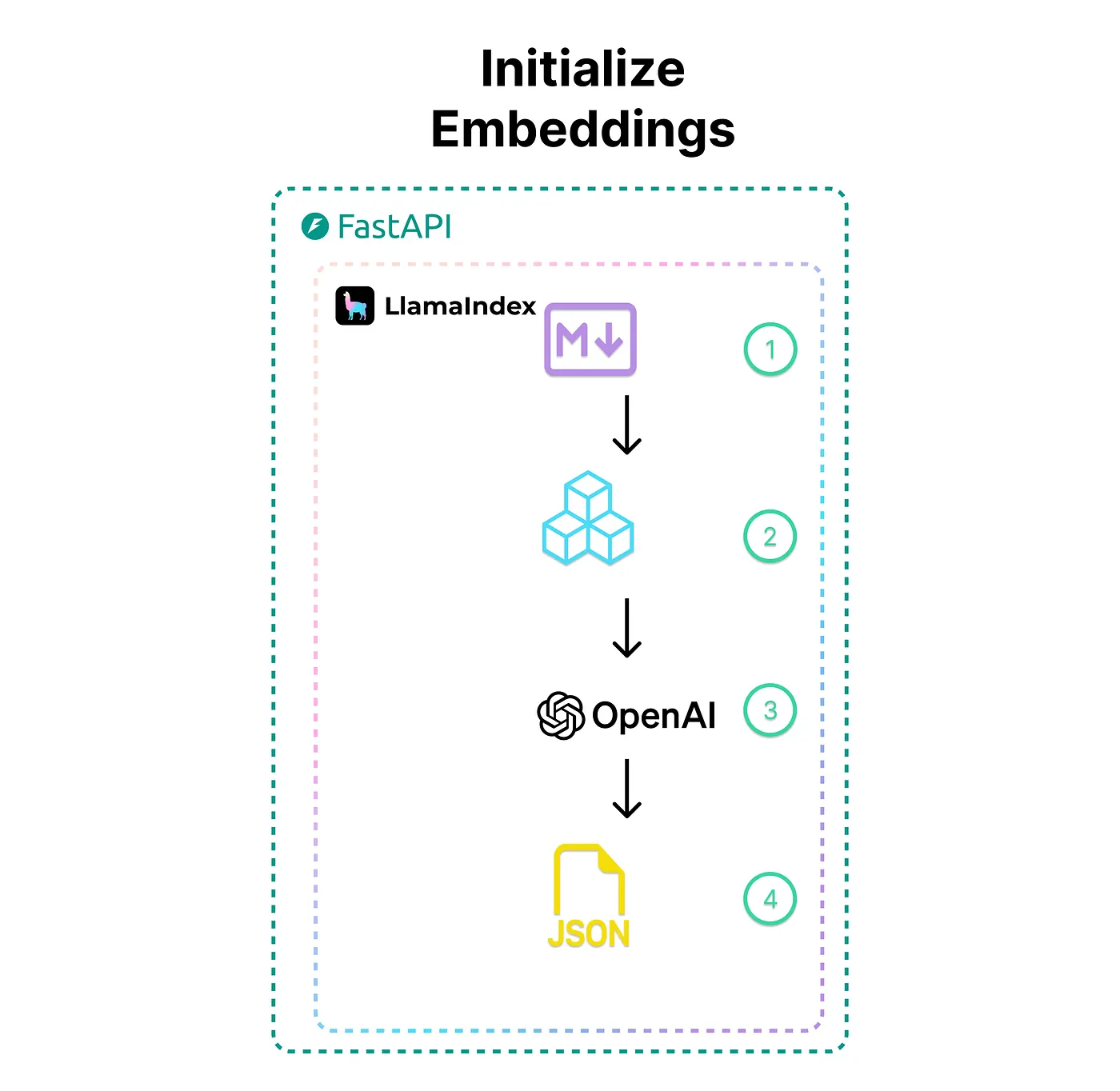
- The relevant class documents (as markdown files) are read
- Using the llama-index framework and custom markdown chunking extension, we chunk the documents into chunk size that work well for our use case
- Next we embed the chunk using OpenAI models and llama-index
- Lastly, the embeddings are saved in a local json store that llama-index helps to create. Since the class documents don’t change over time, there isn’t really a need for a more complex vector store
During normal operation a student will interact with the chatbot to start the RAG workflow. The workflow is outlined below.
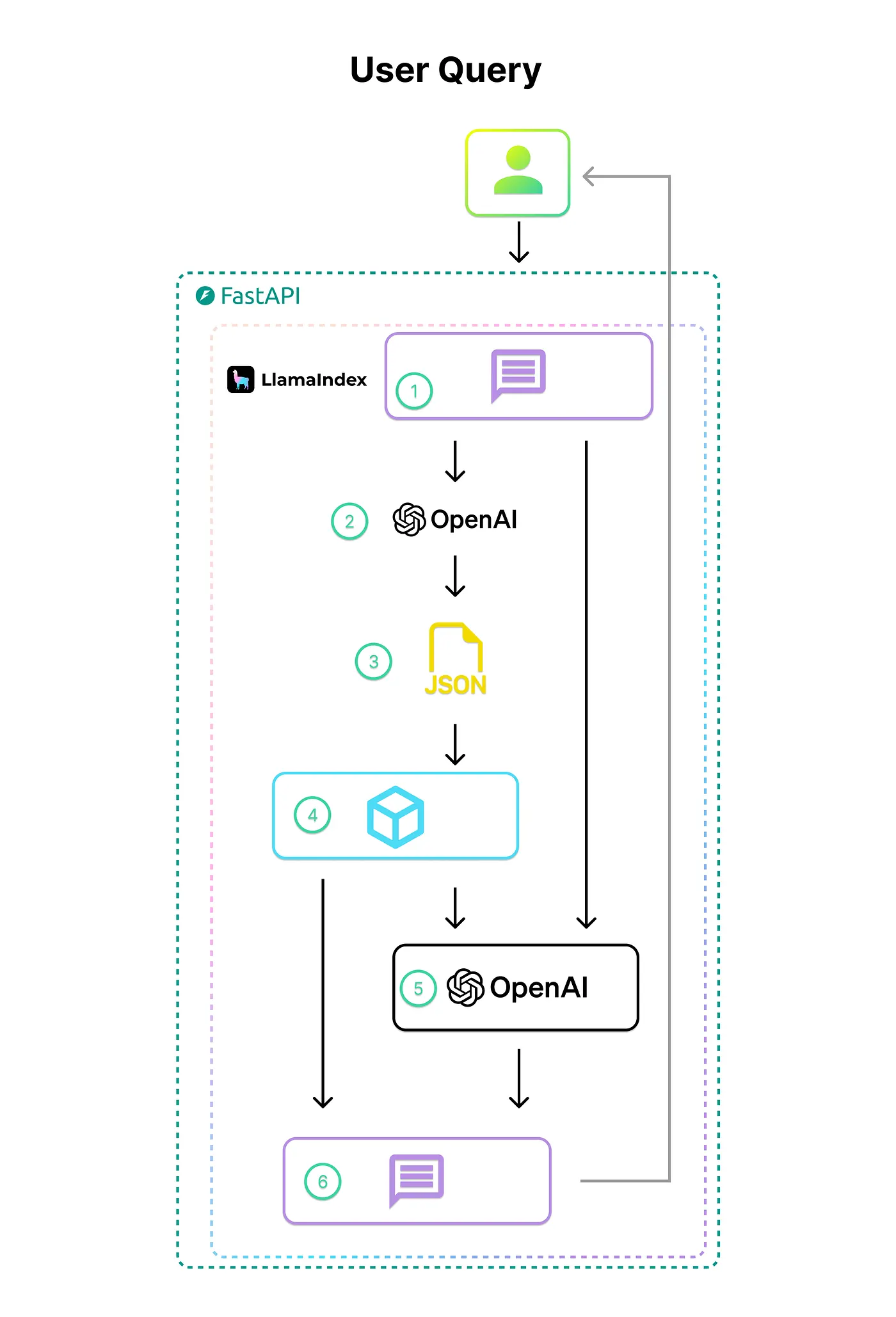
- The student asks a question about the class
- Llama-index with OpenAI is used to create and embedding from the user query
- The user query embedding is used to query against the vector store
- The 2 most similar documents are retrieved from the vector store.
- The retrieved documents are injected into the query prompt before it is sent to the OpenAI model
- The OpenAI response is streamed to the student, and the metadata for the two most similar documents are also displayed to the student.
Lessons Learned
What when well
Using RAG for this use case worked well. LLM agents are hot at the time of writing this, but for our use case a simple, no-frills RAG pipeline worked well to return quality results, even with using slightly older OpenAPI models. Most responses were very reasonable despite minimal prompt engineering.
HTMX and Fast API made it easy to build out the full stack app, and it was a pleasant experience. Since the OpenAI requests and RAG embedding lookup already add time to the overall query response time, it was important to have a lightweight frontend like HTMX to keep any unnecessary response overhead time down.
Managed Kubernetes on GCP made it easy to go from local development to deployment. Using kubernetes also allowed me to create a helm chart that enables users to spin up their own instance of the app in just a couple lines of code.
Mocking the POC in Streamlit allowed us to quickly iterate, and boil the app down to just the main components. We decided Streamlit did not give us enough flexibility in the design for the first version of the app.
What I would change
Halfway through the project, I had to make updates related to llama-index because how the context was set had changed in the latest version. LLM related libraries are new, and we can expect them to change more than stable libraries like Pandas or Numpy. For a simple use case like this, I might not have even needed to use a framework until I want to experiment with more complex functionality.
I used websockets to try and get response times as low as possible. However, they added more complexity, and I think they were probably more trouble than they were worth. Streaming text back with a websocket vs rest response probably wouldn’t have made that big of a difference
Using the UIKit framework for the frontend styling worked well at first, but changing the theme was a little more involved than I would have liked. I think it would be worth checking out Tailwind CSS for the styling for future apps that require more custom theme styling.
If you’re interested in trying out the app, you can find the instructions to set up your own local instance on GitHub
Disclaimer: This material is based upon work supported by the Google Cloud Research Credits program. Regardless, I think GCP is the best platform for deploying Kubernetes based applications.